State machine
The craniodistraction workflow is implemented as a finite-state machine where the system can be in exactly one of a finite number of a states at any given time. Transitions between states are triggered by various events, such as user clicking a button or pressing a keyboard shortcut. Transitions may contain checks to verify that all the pre-requisites for the next state are met. The craniodistraction states and transitions are illustrated in Figure 1.
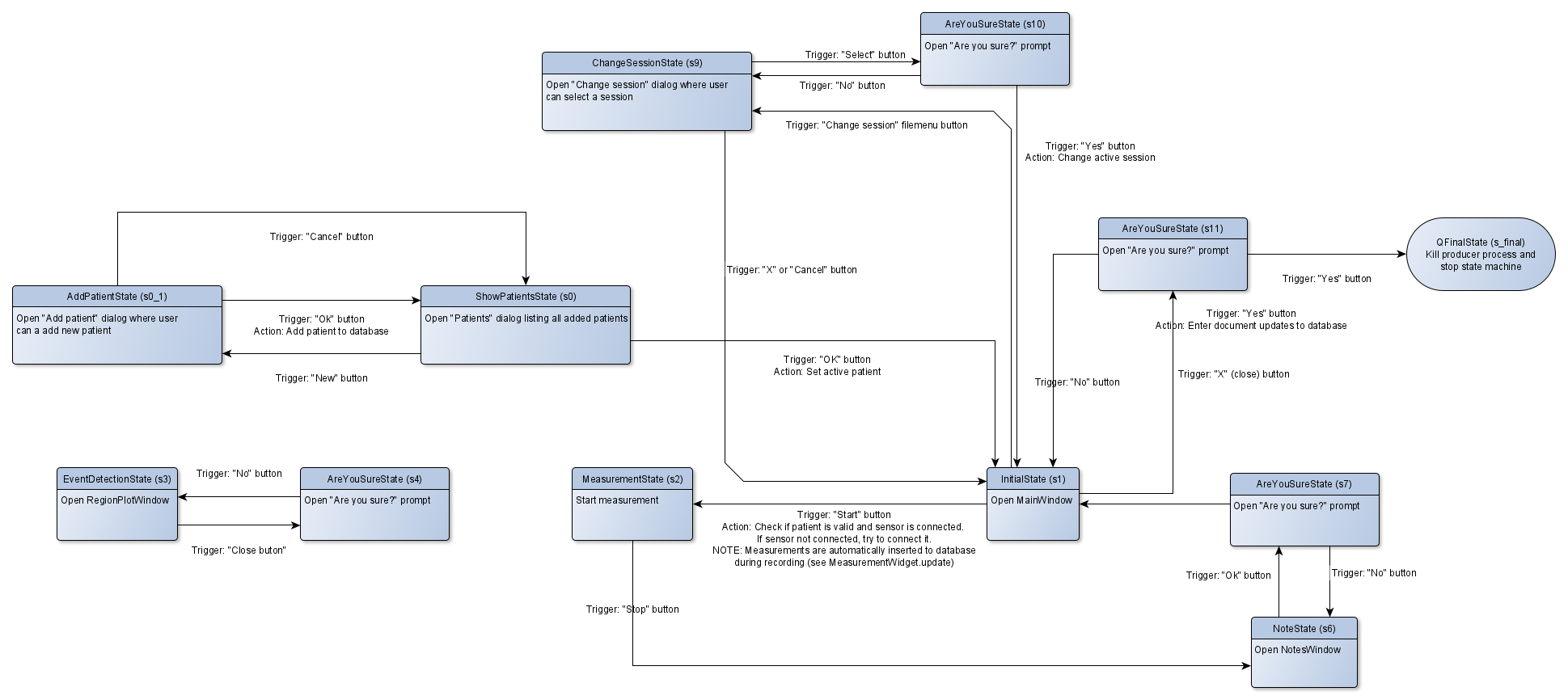
Figure 1. State diagram
A typical measurement state flow goes as follows (software state in brackets):
- [
InitialState] Start the software - [
InitialState] Connect torque sensor from the Connect menu - [
InitialState] Click Start - [
MeasurementState] Click Stop when the measurements are complete - [
EventDetectionState] Annotate events and click Ok - [
NoteState] Enter number of full turns and notes and click Ok - [
AreYouSureState] Click Yes - [
InitialState] Click Start to begin next measurement
Keyboard shortcuts
To streamline the measurement workflow, the following keyboard shortcuts are enabled:
InitialState- Enter = Click Start
- Up / Down arrow = Click distractor Up / Down arrow
MeasurementState- Enter = Click Stop
EventDetectionState- Enter = Click Add if no events have been annotated yet. Otherwise, Click Ok.
- Up / Down arrow = Click Up / Down arrow in Add/remove events groupbox
NoteState- Enter = Click Ok
AreYouSureState- Enter = Click Yes